FastAPI Tutorial: Architecture, Core Concepts, and a CRUD API Example
Introduction
I’ve been hearing a lot about a Python web framework called FastAPI. The purpose of this post is to understand the basics of FastAPI by exploring:
- What is FastAPI?
- When to use it?
- When not to use it?
- FastAPI vs DRF
- FastAPI Architecture
- FastAPI Core Components
- How to get started with a simple project
What is FastAPI?
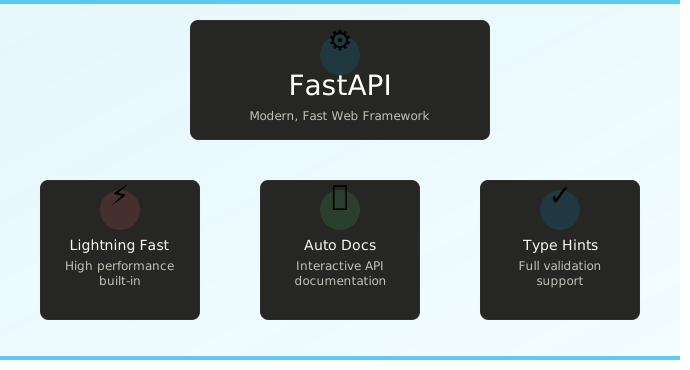
FastAPI is a Python web framework for building APIs. Decorators (like @app.get(“/end_point”) are used to define endpoints, it uses Python type hints to automatically validate incoming data, convert types and generate interactive API documentation (at /docs) out of the box.
It is built on Starlette (for the web layer) and Pydantic (for data validation)
What is Starlette?
Starlette is a lightweight python web framework built on ASGI (Asynchronous Server Gateway Interface) which is sucessor to WSGI (Web Server Gateway Interface). FastAPI is built on top of Starlette by adding automatic data validation, serialization and API docs to it.
What is Pydantic?
Pydantic is a python library for data validation using type hints. Let me elaborate with an illustration for better understanding.
Pydantic model example
from pydantic import BaseModel

class Customer(BaseModel):
    name: str
    age: int
    email: str

user = Customer(name="Alice", age=25, email="alice@example.com")  # works
user = Customer(name="Alice", age="not a number", email="...")    # validation error
The above class takes 3 parameters as input name as string, age an integer, and email as string. If the user passes an invalid data type like e.g., age=”not a number” it will throw a validation error as it is expecting an integer. However, Pydantic does “type coercion”. Let us consider the user passes age=”45”, the expectation is to throw a validation error as the input is a “string” and expected type is “int” but in reality due to the intervention of “type coercion” the string is automatically converted to integer and the execution continues.
FastAPI uses Pydantic under the hood so that when a request comes in, the JSON body is automatically parsed and validated against your model before your function even runs.
When to choose FastAPI?
One should use FastAPI if speed, validation and clean code take precedence. The best use cases would be:
- Building highly performant REST APIs
- ML/AI services
- Auto-generated documentation matters
- Rapid prototyping
When not to choose FastAPI?
If your ecosystem is already using a robust framework (like Django for example) it is not advisable to switch to FastAPI unless you have a niche requirement to do so. Some factors to help make the decision are listed below:
- Avoid FastAPI if your application involves CPU-Intensive tasks (image processing,video encoding etc). You can workaround it but it is not possible out of the box.
- If you need one web framework with Full Stack needs then FastAPI is not the right fit.
- Asynchronous programming comes with a little bit of learning curve, if the team has less experience in asynchronous programming and do not have the luxury of investing time to learn it then it is advisable not to use FastAPI.
- If your project does not support async or does not have the need of async then it is best to avoid FastAPI. Without async you will lose the primary performance benefit of FastAPI. You can still use FastAPI without async but there are other frameworks better suited for the use case.
FastAPI vs DRF
| Feature | FastAPI | DRF |
|---|---|---|
| Based on | Starlette+Pydantic | Django |
| Performance | Very fast | Slower |
| Object Relational Mapping | Not built-in | Django ORM (built-in and powerful) |
| Admin Panel | No | Yes (Django admin) |
| Authentication & Permissions | Basic | Rich & built-in) |
Core Components
-
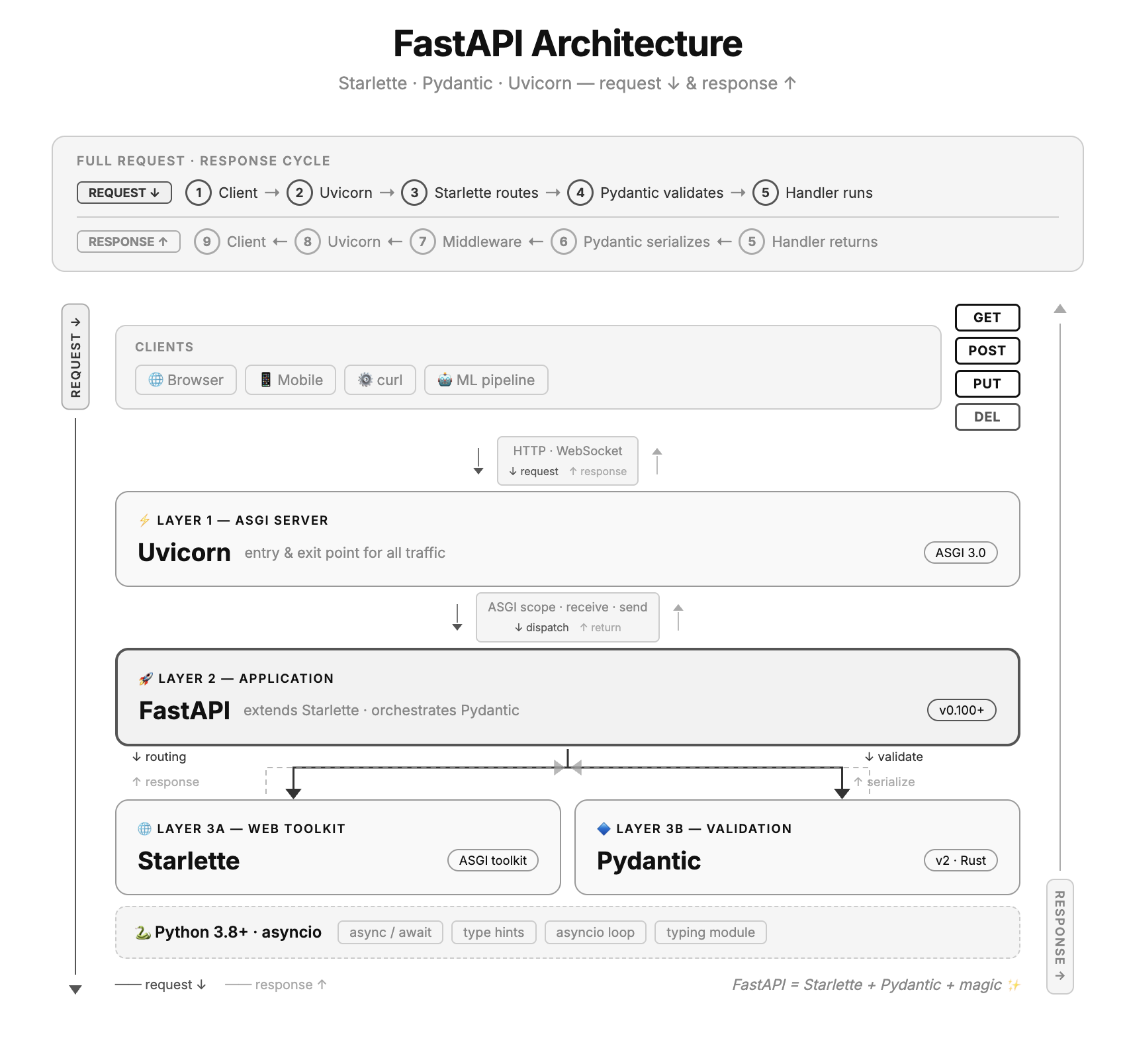
ASGI Server (Uvicorn) The server that runs the FastAPI app. It receives HTTP requests from clients and sends responses back. Built on uvloop (a fast async event loop) and httptools (a fast HTTP parser)
-
Starlette FastAPI directly subclasses Starlette, inheriting all its capabilities. It handles the routing, middleware, request/response objects, websockets and static files.
-
Pydantic This component is responsible for data validation. It powers all input validation and output serialization. Once you define a BaseModel using Python type hints, FastAPI enforces it automatically — no extra code needed for it.
-
OpenAPI & Auto Docs FastAPI auto-generates an OpenAPI schema from your code. Two interactive docs UIs are available out of the box — Swagger UI at /docs and ReDoc at /redoc - without any extra setup
-
Dependency Injection (DI) System A clean system to share reusable logic across routes — database connections, authentication, configuration. FastAPI resolves dependencies automatically before calling your handler.
Dependency Injection example?
from fastapi import FastAPI, Depends

app = FastAPI()

# --- Dependency function ---
def get_db():
  db = connect_to_database()
  try:
      yield db        # provides the db to the route
  finally:
      db.close()      # runs after the route finishes

# --- Route using the dependency ---
@app.get("/items")
def read_items(db = **Depends**(get_db)):
  return db.query("SELECT * FROM items")
Steps:
- Define a dependency function (for e.g., def get_db which returns a database handle)
- Call the dependency function name in the route using “Depends” (Depends(get_db)
Dependency Injection vs Direct Call
Looking at the above example, one may argue that one can use the direct call of the method (e.g., get_db()) why use dependency injection? On the surface, it looks similar but it does more than a direct call. Below are some points that make it different:
- LifeCycle Management
With a direct call, you have to manage setup and teardown yourself:
python# Direct — you manage everything
@app.get("/items")
def read_items():
   db = get_db()
   try:
       result = db.query(...)
       return result
   finally:
       db.close()   # easy to forget!
With Depends(), the dependency handles it:
def get_db(): db = connect() try: yield db finally: db.close() # always runs, even on errors @app.get("/items") def read_items(db = Depends(get_db)): return db.query(...) # clean, nothing to manage -
Caching within a request If multiple routes need the same method, Depends() calls it only once per request and reuses the result but with direct call the method is called multiple times within the same request.
- Automatic parameter injection Dependencies can read query params, headers, and path params directly from the request — without you passing anything but with a direct call, you’d have to extract the header manually in every route.
-
Middleware Functions that run on every request before it reaches your route handler, and on every response before it goes back to the client. Common uses: CORS, logging, authentication, GZip compression.
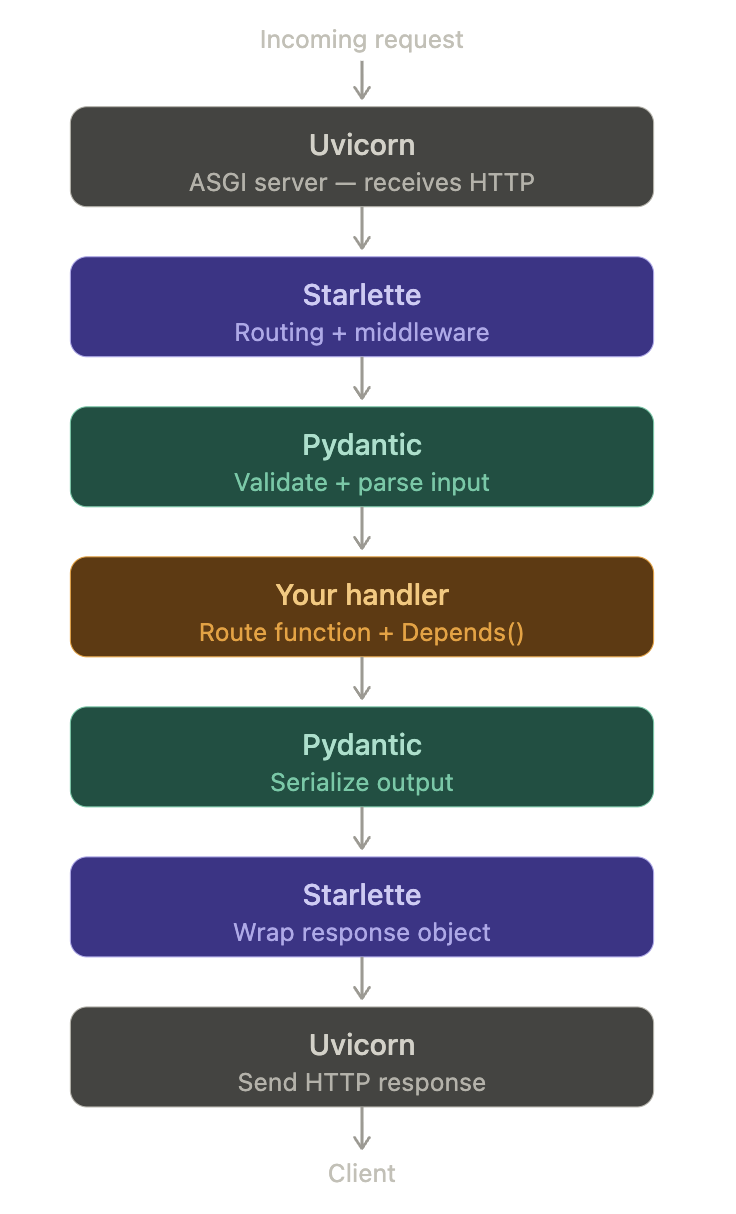
Fast API Workflow
Getting Started
Prerequisites
- Python 3.10 or higher
Problem Statement
Develop APIs for a book store. The API should be able to list all books in stock, add a new book to the bookstore inventory, update a book entry and delete a book entry
Check out the source code on GitHub-FastAPI-Sample.
1. Install fastapi module
pip install fastapi uvicorn
 % pip install fastapi uvicorn
Collecting fastapi
  Downloading fastapi-0.135.1-py3-none-any.whl.metadata (30 kB)
Collecting uvicorn
  Downloading uvicorn-0.41.0-py3-none-any.whl.metadata (6.7 kB)
....
.....
Successfully installed annotated-doc-0.0.4 annotated-types-0.7.0 anyio-4.12.1 click-8.3.1 fastapi-0.135.1 h11-0.16.0 idna-3.11 pydantic-2.12.5 pydantic-core-2.41.5 starlette-0.52.1 typing-extensions-4.15.0 typing-inspection-0.4.2 uvicorn-0.41.0
2. Import libraries and create FastAPI object
from fastapi import FastAPI, HTTPException
from pydantic import BaseModel
from typing import Optional

app = FastAPI()
3. Define schema
# Input schema — what the client sends
class Book(BaseModel):
    name: str
    price: float
    in_stock: bool = True

# Update schema — all fields optional for partial updates
class BookUpdate(BaseModel):
    name: Optional[str] = None
    price: Optional[float] = None
    in_stock: Optional[bool] = None

# Output schema — what the API returns
class BookOut(BaseModel):
    id: int
    name: str
    price: float
    in_stock: bool
4. FastAPI CRUD
4.1. Create - POST
db = {}   # fake in-memory database
counter = 0

@app.post("/books", response_model=BookOut, status_code=201)
def create_item(item: Book):
    global counter
    counter += 1
    db[counter] = {"id": counter, **item.model_dump()}
    return db[counter]
Note: The in-memory database is not recommended for production.
4.2. Read - GET
# Read all
@app.get("/books", response_model=list[BookOut])
def list_items(skip: int = 0, limit: int = 10):
    return list(db.values())[skip: skip + limit]

# Read one
@app.get("/books/{item_id}", response_model=BookOut)
def get_item(item_id: int):
    if item_id not in db:
        raise HTTPException(status_code=404, detail="Book not found")
    return db[item_id]
4.3. Update - PUT/PATCH
# PUT — full update, replaces the entire record
@app.put("/books/{item_id}", response_model=BookOut)
def update_item(item_id: int, item: Book):
    if item_id not in db:
        raise HTTPException(status_code=404, detail="Book not found")
    db[item_id] = {"id": item_id, **item.model_dump()}
    return db[item_id]

# PATCH — partial update, only changes fields you send
@app.patch("/books/{item_id}", response_model=BookOut)
def partial_update_item(item_id: int, item: BookUpdate):
    if item_id not in db:
        raise HTTPException(status_code=404, detail="Item not found")
    stored = db[item_id]
    updates = model_dump(exclude_unset=True)
    stored.update(updates)
    db[item_id] = stored
    return db[item_id]
4.4. Delete - DELETE
@app.delete("/books/{item_id}", status_code=204)
def delete_item(item_id: int):
    if item_id not in db:
        raise HTTPException(status_code=404, detail="Book not found")
    del db[item_id]
5. Add steps 2 to 4 in main.py and run below command:
% uvicorn main:app --reload
INFO:     Will watch for changes in these directories: ['/Users/sathyendhra/django_project3/fastapi-project']
INFO:     Uvicorn running on http://127.0.0.1:8000 (Press CTRL+C to quit)
INFO:     Started reloader process [29028] using StatReload
INFO:     Started server process [29030]
INFO:     Waiting for application startup.
INFO:     Application startup complete.
9. Open “http://127.0.0.1:8000/docs” in the browser
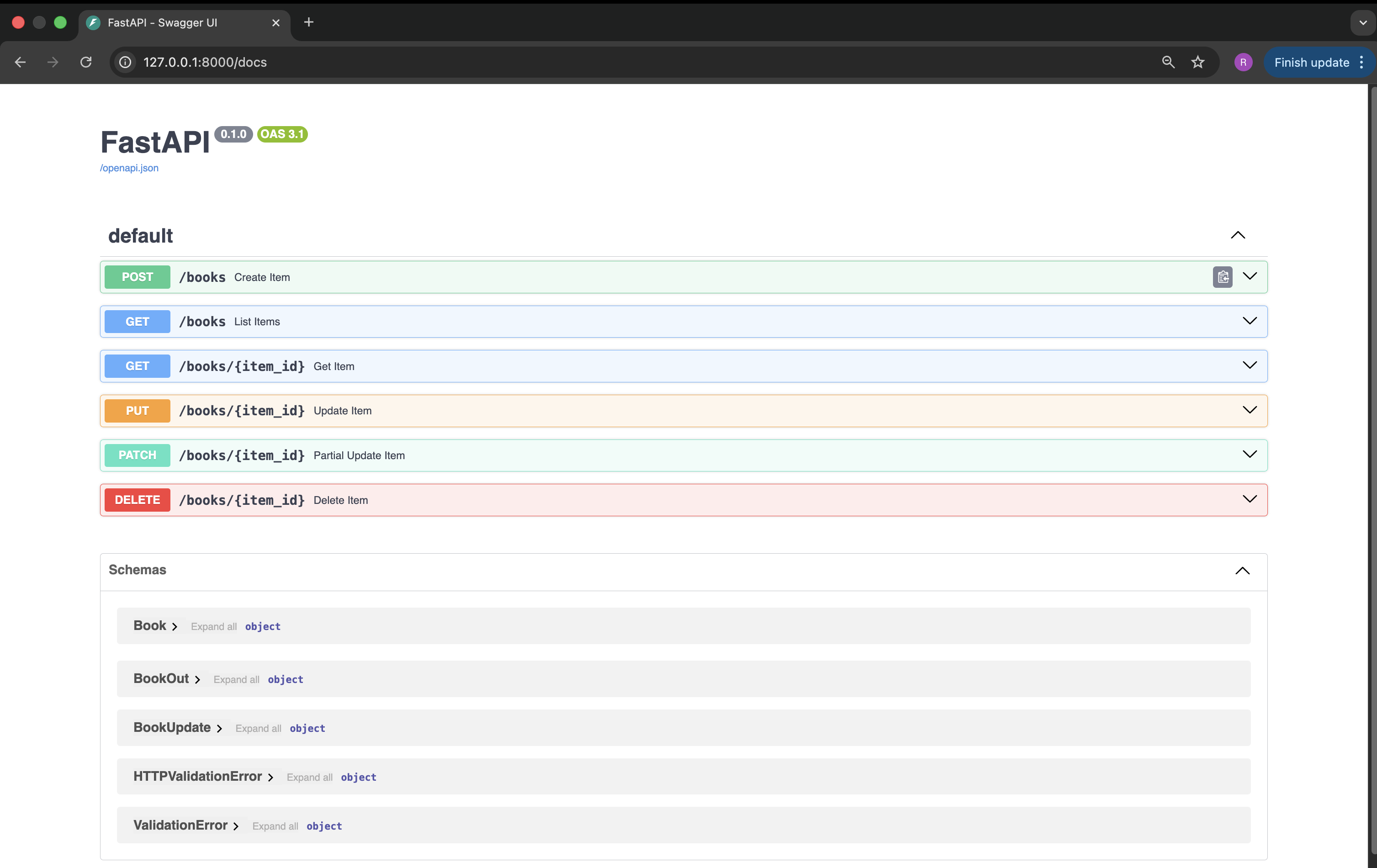
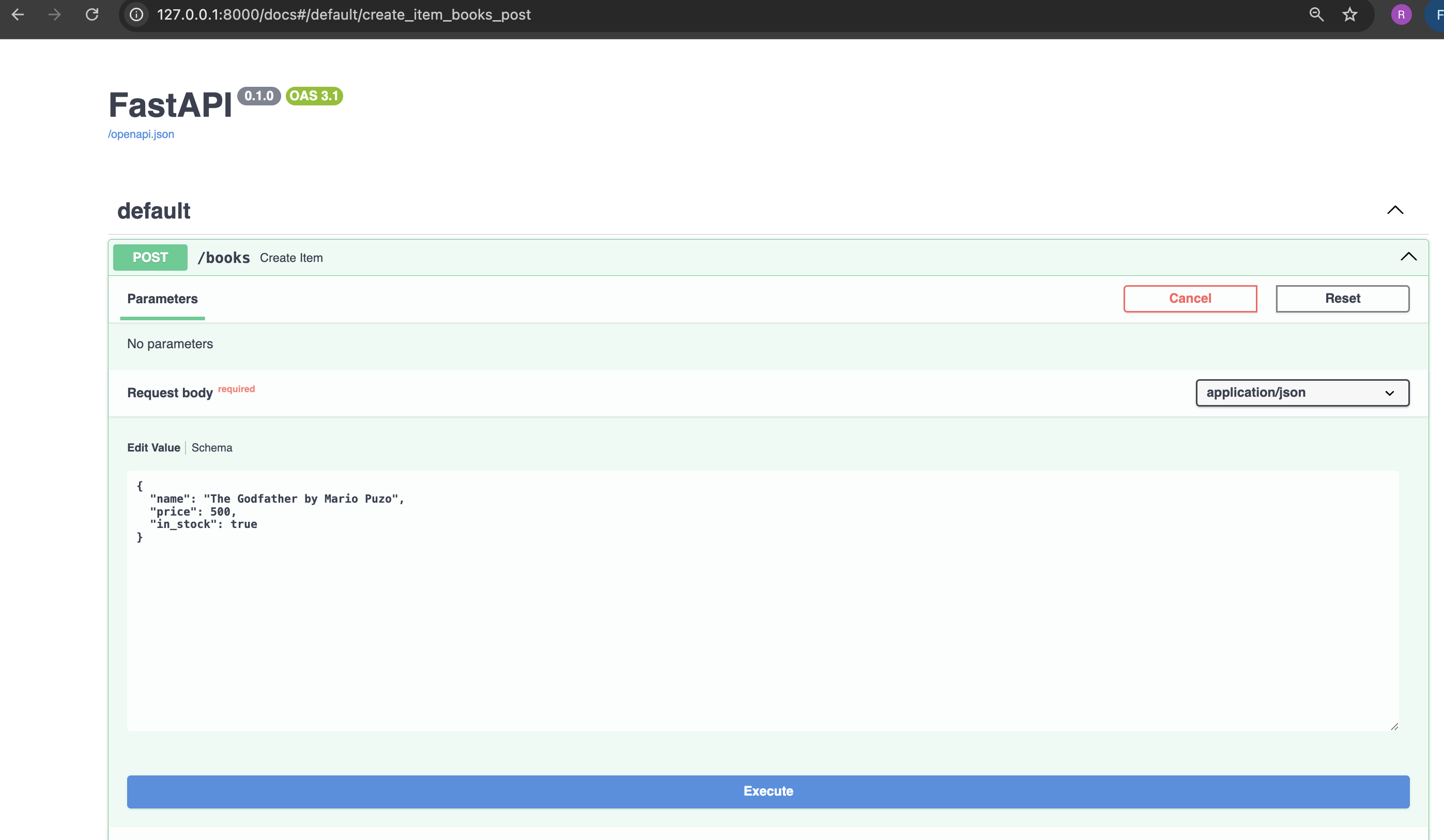
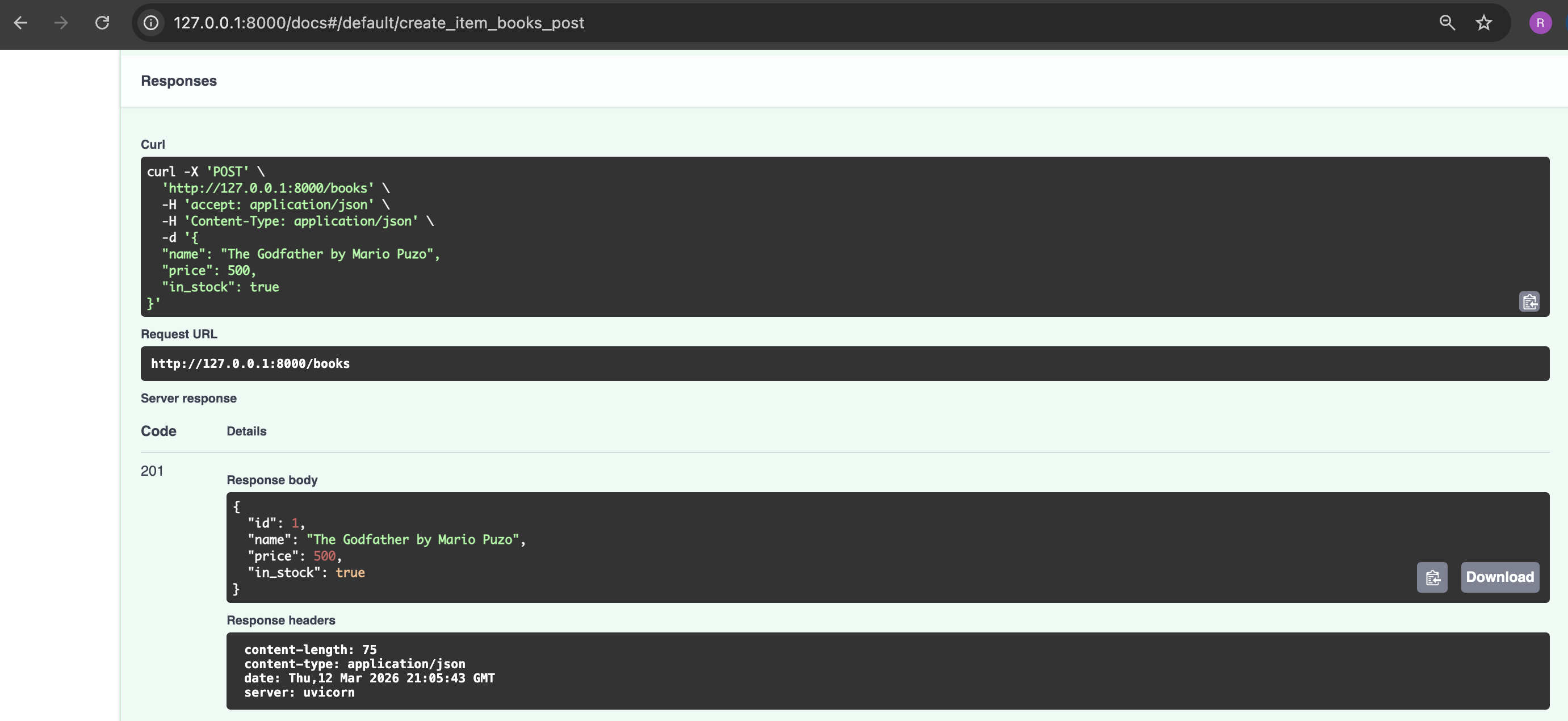
10. Create a book item using FastAPI - Swagger UI
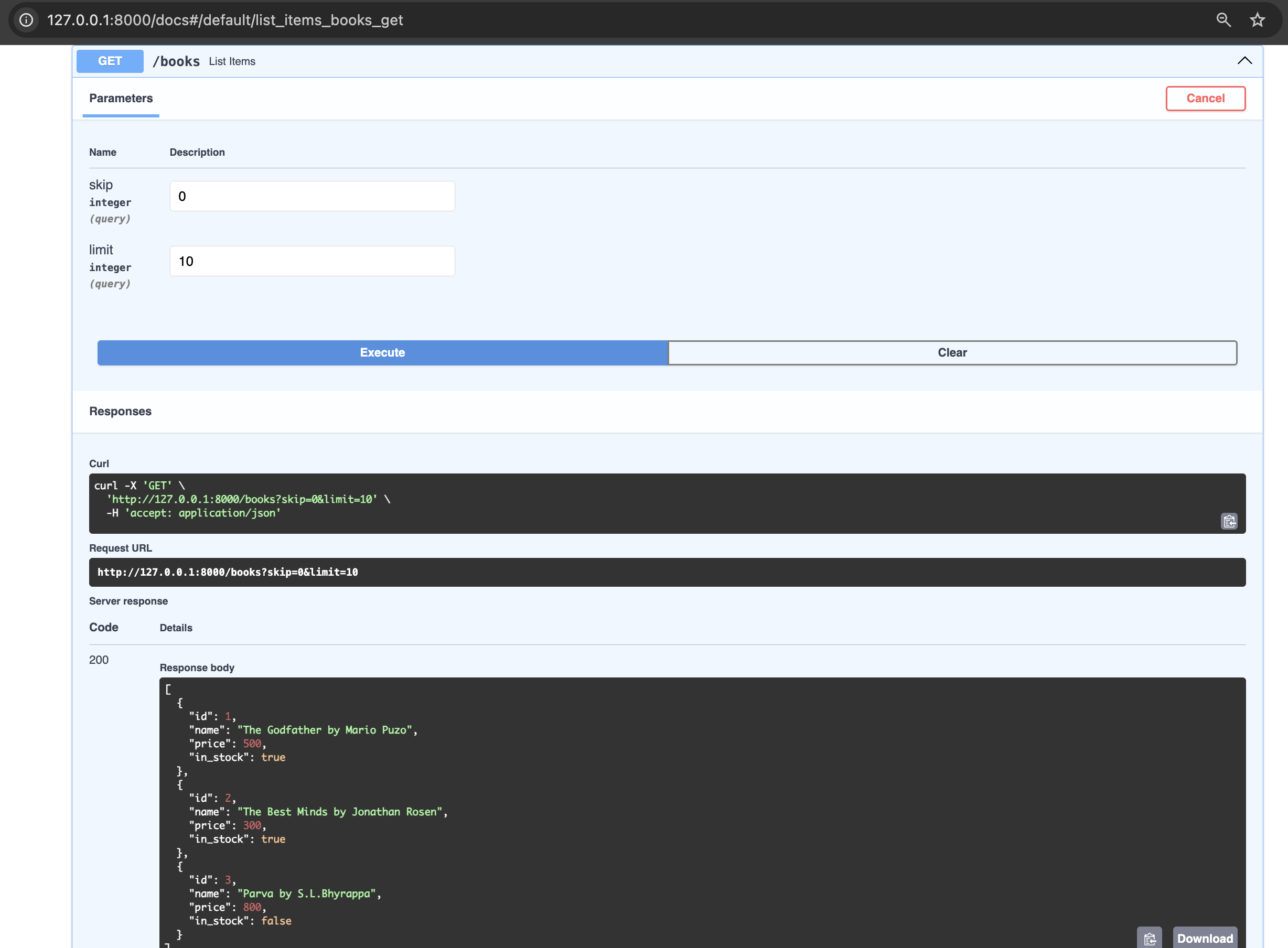
11. List all books in the book store using FastAPI - Swagger UI
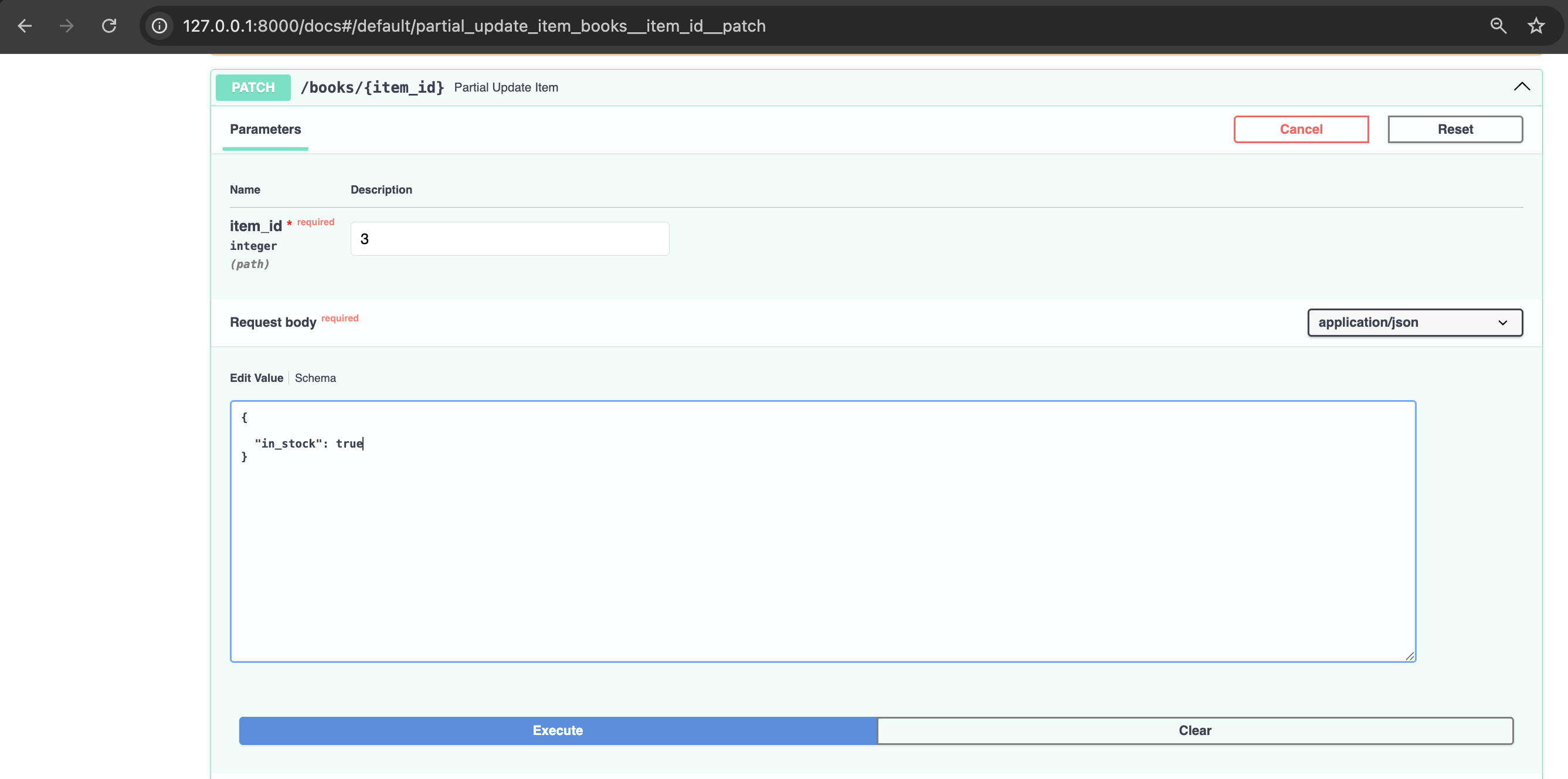
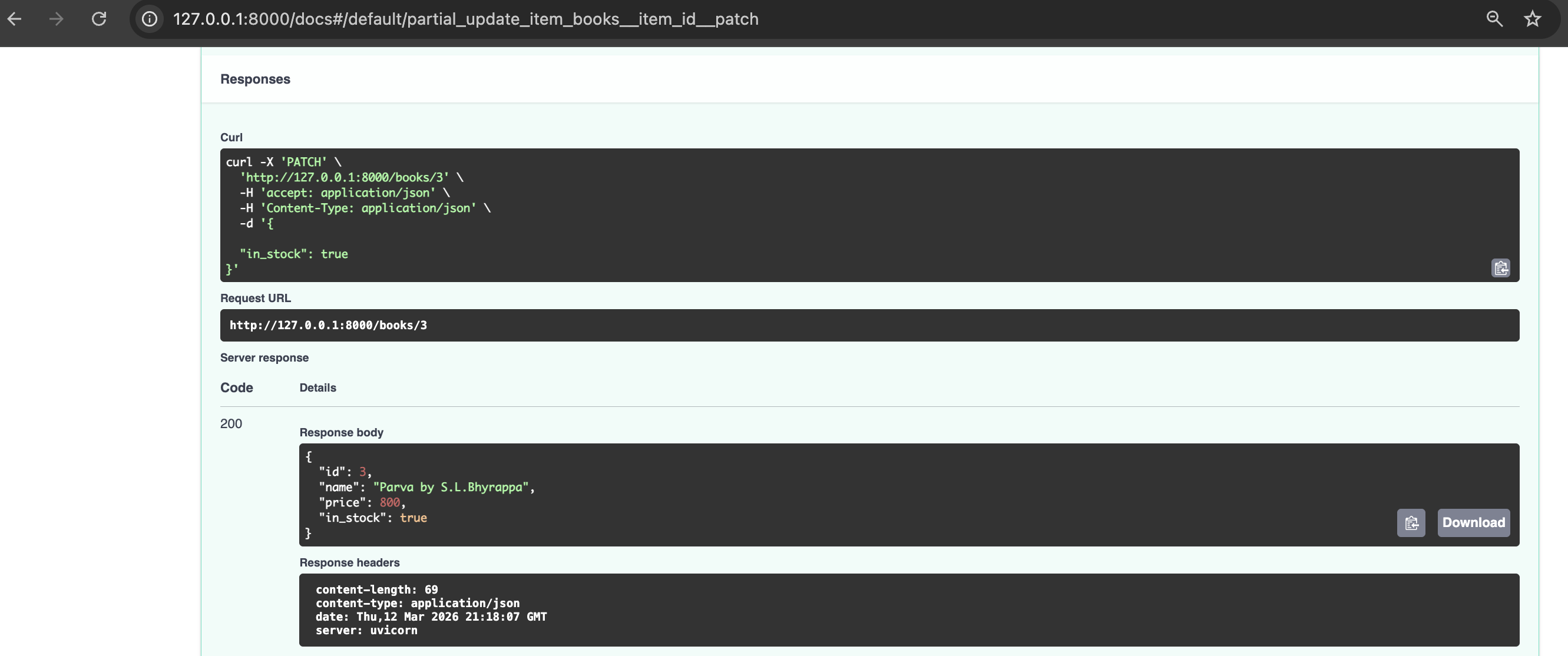
12. Update availability of a book in the book store
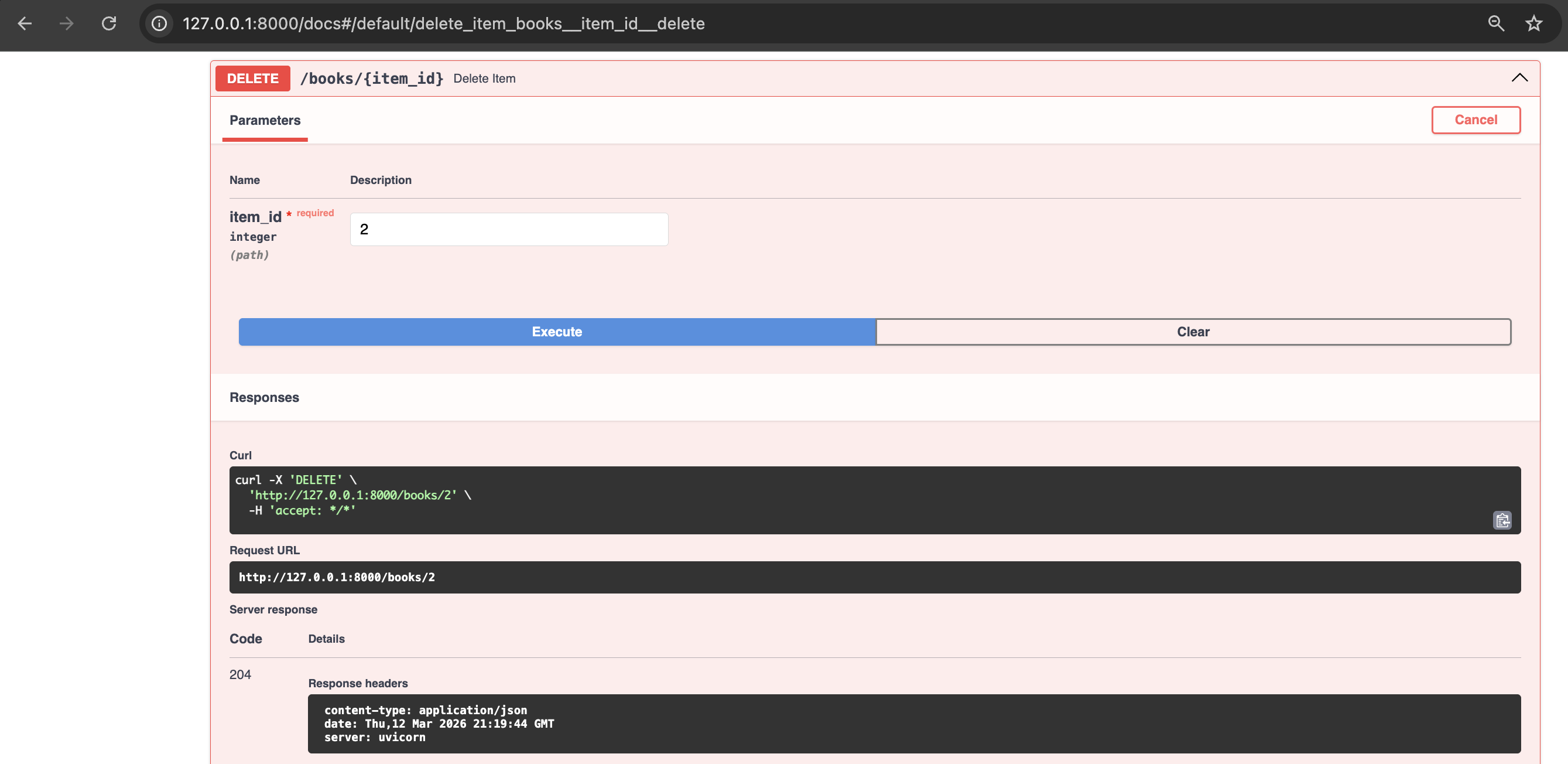
13. Delete a book from the book store
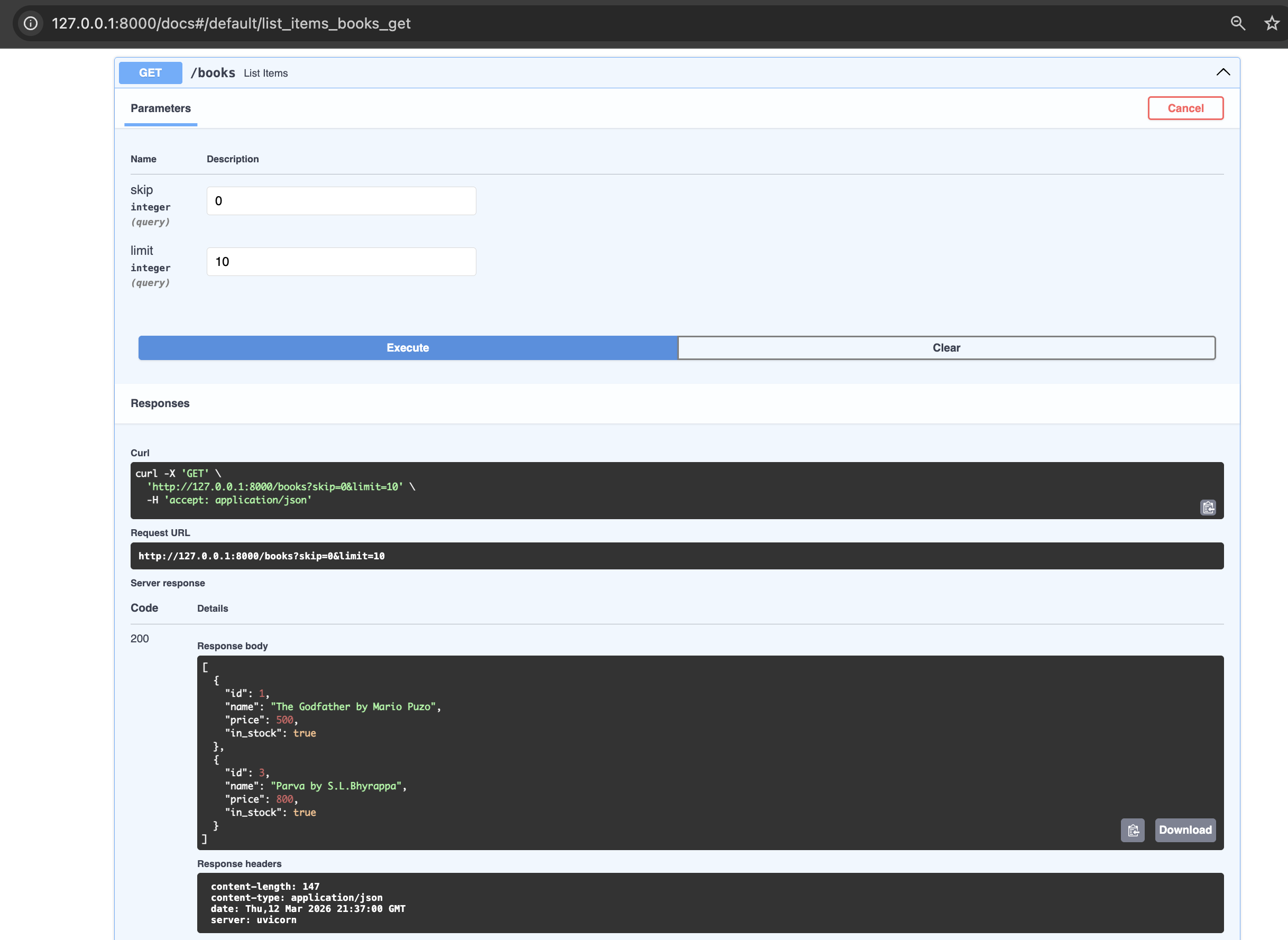
14. List all books in the book store after update and delete operations
Understanding Decorators in python ( optional section for people well versed with this python feature)
As FastAPI uses decorators heavily, let’s understand this elegant Python feature. Basically, a decorator is a function that wraps another function to add behaviour before or after it runs without modifying the existing function.
Think of a decorator as a notebook cover — the notebook (your function) stays the same, the cover adds something around it.
Let us understand this with examples:
- Without decorator
def my_decorator(func):
    def wrapper():
        print("Before")
        func()          # call the original function
        print("After")
    return wrapper

def greet():
    print("Hello!")

# manually wrap it
greet = my_decorator(greet)
greet()

# Output:
# Before
# Hello!
# After
- With decorator
def my_decorator(func):
    def wrapper():
        print("Before")
        func()
        print("After")
    return wrapper

@my_decorator       # same as: greet = my_decorator(greet)
def greet():
    print("Hello!")

greet()

# Output:
# Before
# Hello!
# After
- Decorator with arguments
def repeat(times):
    def decorator(func):
        def wrapper(*args, **kwargs):
            for _ in range(times):
                func(*args, **kwargs)
        return wrapper
    return decorator

@repeat(times=3)
def greet():
    print("Hello!")

greet()
# Hello!
# Hello!
# Hello!
Conclusion
In this post we have explored the basics of FastAPI, equipping you to start building projects using this web framework. As next step one can learn about integrating FastAPI with SQLAlchemy, a powerful combination for building database-backed APIs and also explore writing automated tests for your API using FastAPI’s TestClient tool.
References
- https://fastapi.tiangolo.com/
- https://docs.pydantic.dev
- https://www.uvicorn.org
- https://www.starlette.io
- https://docs.python.org/3/glossary.html#term-decorator
- https://github.com/zhanymkanov/fastapi-best-practices?tab=readme-ov-file#cpu-intensive-tasks