Kubernetes
Introduction
“Kubernetes” – does this term ring a bell? Especially to all the technology enthusiasts out there you must have heard or come across this term, If your answer is yes and you understand everything around it, you may give this concept a skip. For the rest who have heard the term and know briefly about it, stick around and browse through the sections as a refresher and for people who have not heard of this term or are not well versed, worry not, this blog will give you much information to get you started and interested.
The content is divided into 4 parts,
- History
- What is Kubernetes?
- Why Kubernetes?
- How to get started with Kubernetes?
History
Before directly jumping into getting to knowing kubernetes, it is best to understand the evolution of deployments in the software industry. Software deployment is simply a way of running applications, traditionally they were run on physical servers. There were limitations in running application in physical servers which led to the inception of a concept called “Virtualization”.
What are the limitations/drawbacks of running application on physical servers?
One major disadvantage is the lack of ability of sharing resources among different processes easily. Cost also plays an important role, a physical server is pricey to maintain(inclusive of real estate and infra for cooling). Scaling up is not easy and time consuming.
What is virtualization?
In simple terms it is a software which allows to deploy(create) multiple machines using resources of an underlying physical hardware(host).
Virtualization made software or app developments convenient but to further simplify software deployments the concept of container deployments came into existence.
What is container?
An application and its dependencies packaged into one portable unit which is also light weight is referred to as a container.
he high rate of adoption of container deployments gave rise to widespread use of “kubernetes”. So simply put without containers, kubernetes would not exist.
Now with the above concepts in mind, let us proceed to address the main topic i.e.,\
What is Kubernetes?
Kubernetes is an orchestrator which intelligently helps in managing multiple container applications spanning across many hosts.
Why Kubernetes?
The main purpose of container is optimum resource utilization, kubernetes with its intelligence and orchestration help to achieve this across multiple hosts, thereby helping to unlock the purpose and potential of containerized applications.
Kubernetes vs docker
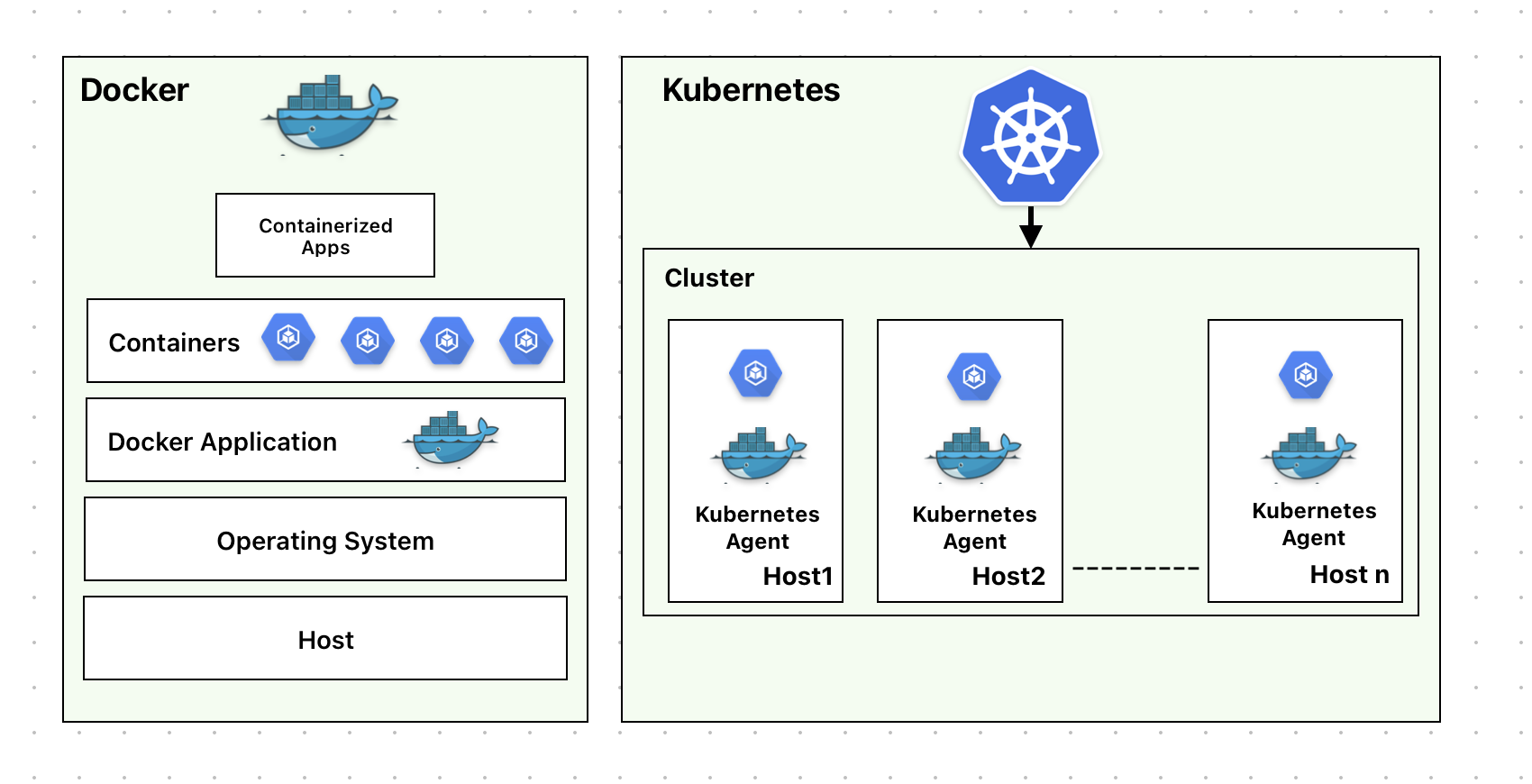
Docker is a containerization platform which helps in building, implementing and running containerized applications limited to one docker instance per host os whereas Kubernetes is much more, it is a platform for running and managing containers from many container runtimes and operates on a cluster level on many hosts. Docker is one of the many runtimes kubernetes supports.
How to get started with kubernetes?
Steps for mac
Install kubectl
curl -LO "https://dl.k8s.io/release/$(curl -L -s https://dl.k8s.io/release/stable.txt)/bin/darwin/amd64/kubectl"
Check Installation
curl -LO "https://dl.k8s.io/release/$(curl -L -s https://dl.k8s.io/release/stable.txt)/bin/darwin/arm64/kubectl.sha256"
echo "$(cat kubectl.sha256)  kubectl" | shasum -a 256 --check
kubectl: OK
Make the kubectl binary executable.
chmod +x ./kubectl
Move the kubectl binary to a file location on your system PATH.
sudo mv ./kubectl /usr/local/bin/kubectl
sudo chown root: /usr/local/bin/kubectl
Test to ensure the version you installed is up-to-date:
kubectl version --client
Client Version: v1.31.3
Kustomize Version: v5.4.2
Verify kubectl configuration
kubectl cluster-info
Once the setup is complete, cluster-information can be got. Let us understand more about kubernetes cluster in the next section.
Kubernetes Cluster
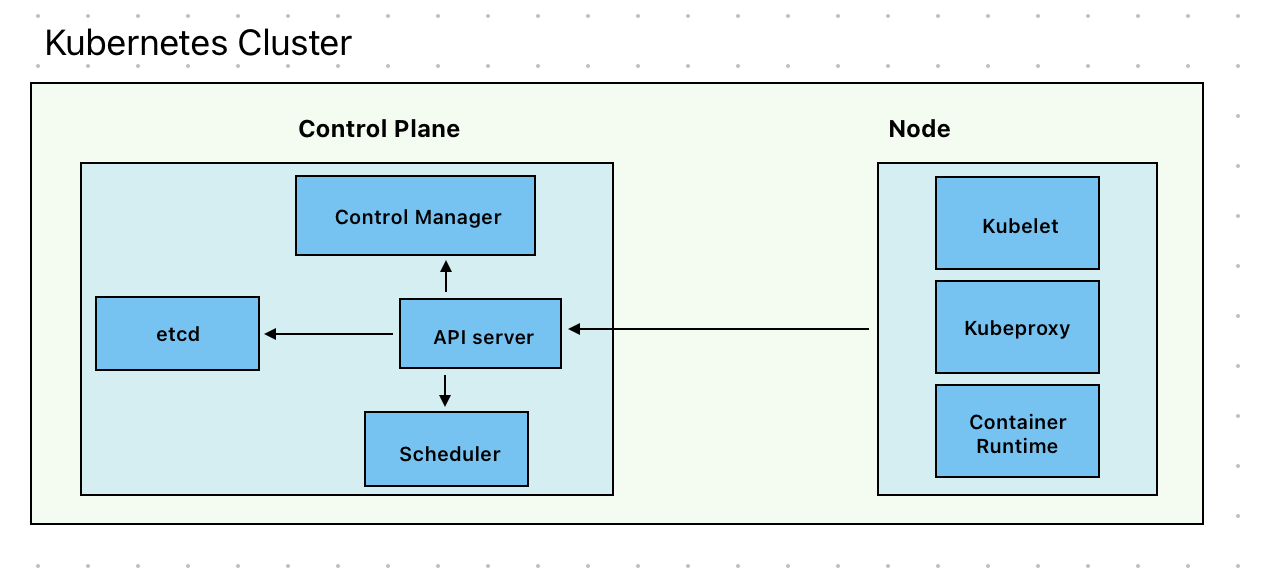
Kubernetes cluster is composed of two components,
- kubernetes nodes
- kubernetes control plane
Kubernetes node comprises of:
- kubelet - Responsible for running pods along with their containers using container runtime
- kube-porxy - Optional component which is used to maintain networking rules on nodes to implement services.
- container runtime - container runtime software used by kubelet to run containers.
Kubernete control plane consists of
- kubeapi server - It is the core component that is responsible to expose http API’s of kubernetes.
- control manager (including optional cloud control manager) - It is a controller to implement kubernetes API behavior
- scheduler - Ensures that all pods are assigned to a suitable node
- etcd - key value datastore for API server data which is conistent and highly avaialble
In the next section let us understand about pod in kubernetes and how to create it,
What is a pod? or What are pods in kubernetes?
Pod is smallest deployable unit that can be created and managed by kubernetes. It can contain one or more containers. Generally it is one conatiner per pod but depending on the business use case it can accomodate more than one container.
How to deploy a sample pod?
Below is a sample yaml file that deploys a pod running nginx container with image nginx:1.14.2
apiVersion: v1
kind: Pod
metadata:
  name: nginx
spec:
  containers:
  - name: nginx
    image: nginx:1.14.2
    ports:
    - containerPort: 80
Save the above file as nginx.yaml and run the below command:
kubectl apply -f nginx.yaml -n <namespace_name>
Lifecycle of a pod
Pods lifecycle starts with a “pending” phase, followed by “running” when at least one of the containers starts and then moves to “succeeded” if everything goes fine or to a “failed” phase if one of the container terminated with failure.
In real world, individual pods are generally not deployed, they get deployed using workload resources. Let us understand a little bit about workload resources in kubernetes.
Pods are ephemeral
In kubernetes pods are ephemeral meaning that they can be terminated and redeployed by the nodes and are stateless. If a pod needs its identity and data to be non-ephemeral that can be achieved by making it persistent using statefulsets (a type of workload resource in kubernetes) which is briefly described in the next section.
Workload resources supported in kubernetes
Workload resources can be described as API objects that manage and run applications/services on the cluster by ensuring the correct pods are running to match a specified desired state.
Type of workloads supported by kubernetes
1) Deployments - It manages a set of pods to run an application which does not maintain state 2) StatefulSets - It runs a group of pods to run an application which maintains state. For e.g., application requires persistent storage or stable network identity 3) DaemonSet - It ensures that all nodes have a copy of pod. For e.g., a copy of logs collection running on each node
Other workload types are replicaset,job,cronjob and replicationController.
Conclusion
In this post we have just scratched the surface in trying to understand the concept of kubernetes. With grasp of the above, one can embark on the journey of exploring deeper into the world of kubernetes.
References
- https://kubernetes.io/docs/tutorials/kubernetes-basics/
- https://portworx.com/blog/kubernetes-vs-virtual-machines/
- https://www.atlassian.com/microservices/microservices-architecture/kubernetes-vs-docker#:~:text=Kubernetes%20can%20be%20used%20with,containers%20a%20week%20at%20scale.
- https://www.index.dev/blog/kubernetes-vs-docker